
NFT 图像 NFT Image#
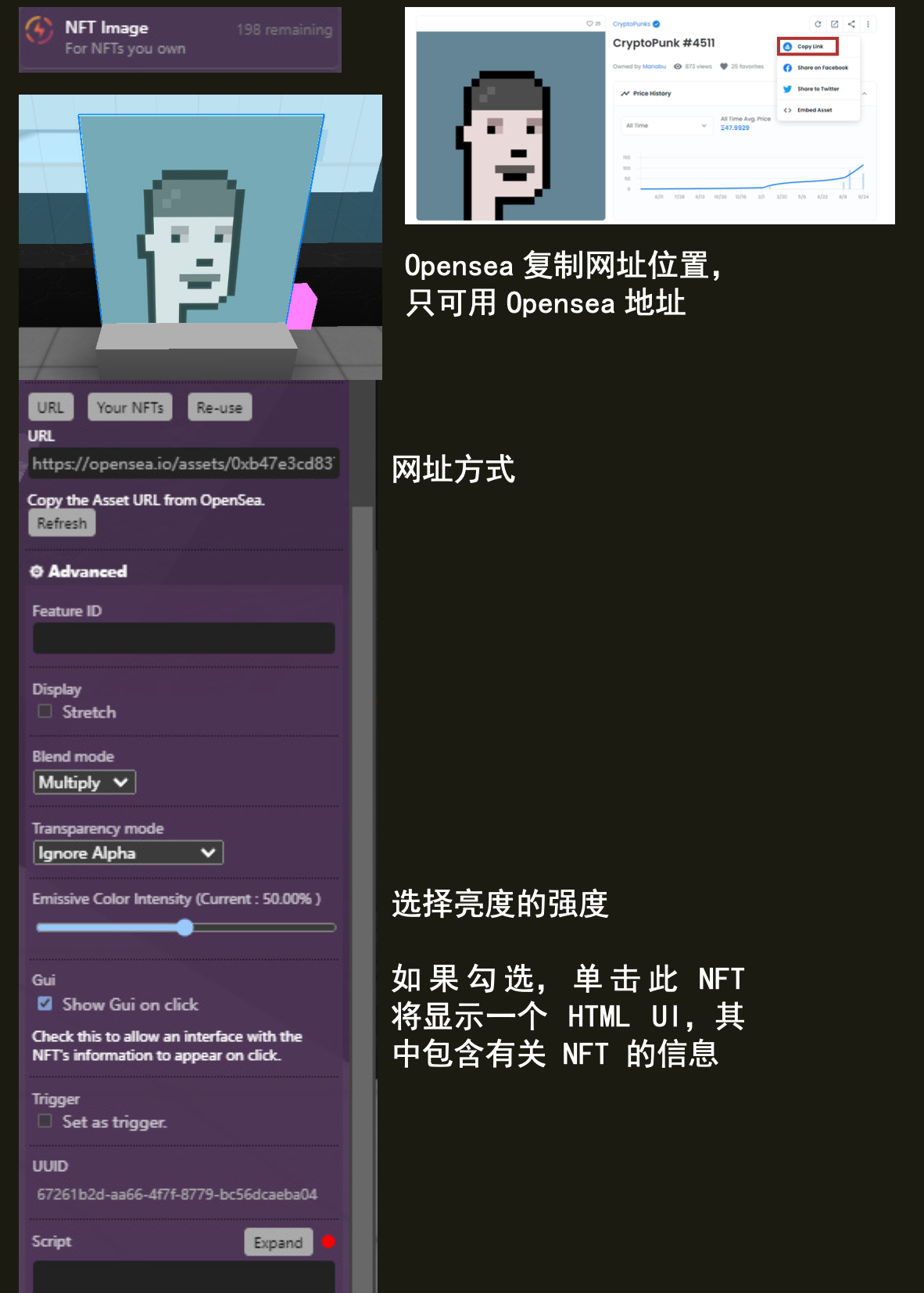
展示您所拥有的NFT图像。
Editor 编辑器#
Opensea Asset URL | Opensea 资产 URL#
备注
示例链接,可以在 https://opensea.io/ 创建自己的NFTs https://opensea.io/assets/ethereum/0x495f947276749ce646f68ac8c248420045cb7b5e/112862529825773578657241264150888633317941584966682201326871688929680778330122/
复制 OpenSea 中的资产 URL。
stretch 拉伸#
拉伸图像以适应比例。
Blend Mode 混合模式#
这用于确定图像如何与其后面的内容混合。可用选项有 Combine 组合 、Multiply 乘法 和 Screen 屏幕 。
Transparency mode 透明度模式#
选择如何处理alpha值。(忽略或不忽略)
Emissive Color intensity 发射颜色强度#
选择亮度的强度。
Gui#
如果勾选,点击此 NFT 将显示一个 HTML UI,其中包含有关 NFT 的信息
脚本属性#
String; Links must be https://.
get()
feature.get('url')
// returns: "https://..."
set()
feature.set({'url':"https://www.opensea.io/"})
default
""
Boolean;
get()
feature.get('stretch')
// returns: "https://..."
set()
feature.set({'stretch':true})
default
false
ImageMode; An enum :
‘Multiply’
‘Screen’
‘Combine’
get()
feature.get('blendMode')
// returns: "Multiply"
set()
feature.set({'blendMode':"Combine"})
default
Combine
number;
get()
feature.get('emissiveColorIntensity')
// returns: "0.5"
set()
feature.set({'emissiveColorIntensity':0.5})
default
0.5
String;
get()
feature.get('type')
/* or */
feature.type

// returns: 'nft-image'
脚本方法#
A function that returns the opensea nftData of the specified feature.
Arguments: callback (optional); a callback function to handle the nft’s data.
example
feature.getNftData(console.log)
/* returns:
{
animation_original_url: "https://ipfsga..."
animation_url: "https://stora..."
asset_contract: {...}
...
}
*/
example 2
function showContractAddress(data){
 console.log(data.asset_contract.address)
}

feature.getNftData(showContractAddress)
/* returns: 0x1das1rs6dfv...  */