
简单的密码锁示例#
这是一个关于如何制作一个带有6位数字密码的快速示例。
过程#
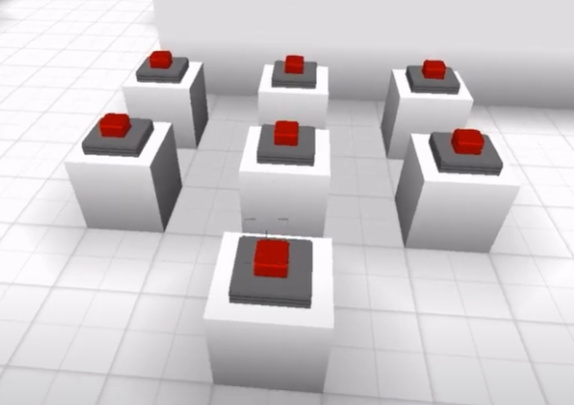
将6个按钮放置在一个网格中,并将它们的ID设置为”b1”、”b2”等。
在底部再放置一个按钮,它将作为一个”输入/清除”按钮。
将下面的代码复制/粘贴到”输入”按钮中。
var correct = [6, 5, 2, 6] // 你的密码

let txt = parcel.getFeatureById('correcttxt') // 显示结果的标牌

/* ---------------- */

var code = [0, 0, 0, 0]

let b1 = parcel.getFeatureById('b1')
let b2 = parcel.getFeatureById('b2')
let b3 = parcel.getFeatureById('b3')
let b4 = parcel.getFeatureById('b4')
let b5 = parcel.getFeatureById('b5')
let b6 = parcel.getFeatureById('b6')

function hasStarted(element) {
  return element == 0
}

b1.on('click', e => {
  console.log('1')
  position = code.findIndex(hasStarted)
  code[position] = 1
})

b2.on('click', e => {
  position = code.findIndex(hasStarted)
  code[position] = 2
})

b3.on('click', e => {
  position = code.findIndex(hasStarted)
  code[position] = 3
})

b4.on('click', e => {
  position = code.findIndex(hasStarted)
  code[position] = 4
})

b5.on('click', e => {
  position = code.findIndex(hasStarted)
  code[position] = 5
})

b6.on('click', e => {
  position = code.findIndex(hasStarted)
  code[position] = 6
})

function arraysEqual(arr1, arr2) {
  i = arr1.length
  for (i; i--;) {
    if (arr1[i] != arr2[i]) {
      return false;
    }
  }
  return true;
}

function reset() {
  code = [0, 0, 0, 0]
}

feature.on('click', e => {
  if (arraysEqual(correct, code)) {
    txt.set({ 'text': "正确" })
  } else {
    txt.set({ 'text': "错误" })
    reset()
  }
})
代码的工作原理如下: 玩家输入4个数字,然后按下”输入”按钮; 如果组合是错误的,标牌txt将显示”错误”,否则它将显示”正确”。